What DNS Is
Quick background before we get to the leak.
Every time you type a website address into your browser, your device needs to translate that human-readable name into a numeric IP address. That translation happens through something called DNS: the Domain Name System. Think of it as the phone book of the internet.
Your DNS queries go to a resolver, usually run by your ISP unless you've changed it. That resolver looks up the address and sends it back. Simple enough. The problem is those queries are logged. The resolver knows every domain you asked about, when you asked, and which IP address made the request.
Your ISP can see every site you visit through DNS logs alone, even if the actual page content is encrypted. That's the list your VPN is supposed to hide.
What a DNS Leak Is
The VPN tunnel with a hole in it.
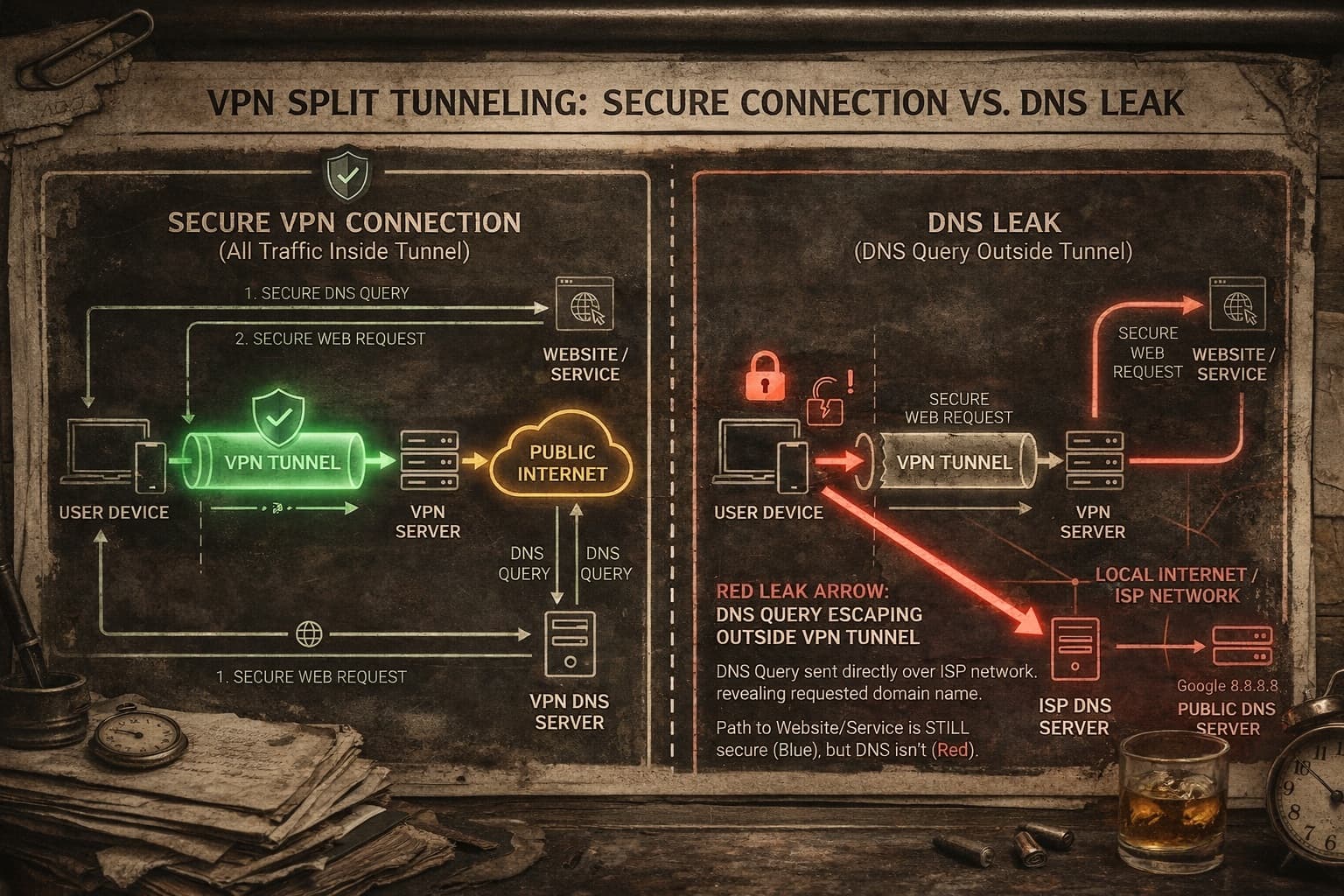
A DNS leak is when your device sends DNS queries outside the VPN tunnel. Your internet traffic goes through the encrypted tunnel, your IP address looks like it belongs to a VPN server in Amsterdam, but your DNS requests are still going straight to your ISP's resolver.
The result: the VPN hides your IP, but your ISP can still log every domain you're visiting. Any third party running a DNS lookup on that session can see exactly where you are and who you are. The encryption was working. The DNS was not.
What happens during a DNS leak
How It Happens
Four ways a working VPN still leaks your DNS.
Most people assume a DNS leak means a broken VPN. Often, it's a perfectly functional VPN running on a system that's doing something the VPN didn't account for. These are the four most common culprits:
Windows Smart Multi-Homed DNS
Windows 8 and later has a feature that sends DNS queries to multiple resolvers simultaneously and uses whichever responds first. A VPN might own one resolver. Your ISP owns the others. Guess who usually wins.
IPv6 Traffic Bypassing the Tunnel
Most VPNs tunnel IPv4 traffic properly but leave IPv6 unprotected. If your connection uses IPv6, those DNS queries go out in the open. Many providers still don't handle this correctly.
Browser DNS-over-HTTPS (DoH)
Chrome and Firefox can be configured to use their own DNS resolver regardless of what your system or VPN says. If your browser is pointed at Google's 8.8.8.8 or Cloudflare's 1.1.1.1, that's where your queries are going.
ISP DHCP Overrides
Some ISPs forcibly push their own DNS server via DHCP when you connect. Depending on how your VPN handles this, the ISP's resolver can end up in the mix without you knowing.
How to Test for One
Takes about 60 seconds. Do it right now.
Testing for a DNS leak is easy. Connect your VPN, then visit one of these tools and look at what DNS servers show up in the results. If you see servers belonging to your ISP or your home country when you're connected to a VPN server elsewhere, you have a leak.
Run the extended test for full results.
Also checks WebRTC and IPv6 simultaneously.
Most thorough. Checks every vector.
What you're looking for: all DNS servers in the results should belong to your VPN provider, not your ISP, not Google, not Cloudflare. If anything shows your real location or your ISP's nameservers, run the extended test to confirm, then test on a second site.
Why VPNs Still Leak
Why 'just use a VPN' isn't always enough.
Budget VPNs and older VPN clients often don't run their own DNS resolver. They route your traffic through an encrypted tunnel but leave DNS handling up to the operating system, which defaults right back to your ISP. The tunnel is real. The DNS protection is missing.
Even reputable VPNs can have edge cases. Reconnection events are a common one: if your VPN drops and reconnects, there's a window where traffic including DNS goes out unprotected. A kill switch cuts the internet entirely during that window. Without one, you leak.
The other issue is split tunneling. If you've configured your VPN to let certain apps bypass the tunnel, and your browser is one of them, every DNS query from that browser is unprotected. People set this up for streaming and forget it applies to everything.
What to Look For in a VPN
What a VPN needs to actually protect your DNS.
Not all VPNs handle DNS the same way. When you're evaluating one, these are the specific things worth checking:
How major VPNs handle DNS
| VPN | DNS Handling | Rating |
|---|---|---|
| NordVPN | Private DNS, DNS leak protection built in, audited | Solid |
| ExpressVPN | Runs its own encrypted DNS on every server | Solid |
| ProtonVPN | Private DNS with full IPv6 leak protection | Solid |
| Mullvad | Extremely strict DNS handling, one of the best | Excellent |
| Generic free VPN | Usually no DNS protection at all | Avoid |
The Bottom Line
The short version.
A VPN that leaks DNS is like a door with a deadbolt and a hole in the wall next to it. The lock works. The hole is the problem. And because everything looks normal on your end, you can run a leaky VPN for years without knowing.
Run the test. Takes sixty seconds. If you find a leak, either fix your current VPN's settings or switch to one that handles DNS properly by default. If you're already on NordVPN, ProtonVPN, ExpressVPN, or Mullvad, you're in good shape, assuming you haven't done anything weird with split tunneling or browser DNS settings.
Privacy is only as strong as its weakest point. DNS is usually that point.
"Turns on VPN, feels safe, forgets the DNS is still talking to the ISP. Classic. Test your setup before you trust it."
— Frank Cache · BuyWiseGuy